My homelab is a k3s cluster spread across a few Mac minis. Linux VMs via Lima, Tailscale for the network, and Flux reconciling everything from a git repo. I gave the full tour of that architecture over on the homelab page. This post is about the secrets side, because every credential in that cluster now flows through Infisical, and it ended up in way more places than I expected.
Just as important, this setup is what lets AI agents work in the cluster the right way. Agents get names to work with, never values. If you're wondering why Infisical instead of SOPS, I wrote up that decision separately. This post is about how the system works today.
Two Infisicals
On-prem Infisical, self-hosted in the cluster, is the source of truth for runtime app secrets. Every app gets its own project and its own machine identity. If an app reads an API key at runtime, it comes from here.
Cloud Infisical holds exactly three things in a project I call the bootstrap kernel. The Cloudflare token cert-manager needs for DNS-01, the Tailscale OAuth client, and the on-prem server's own environment. These live in cloud because the on-prem server's database sits on storage inside the cluster it serves, so on a full rebuild anything needed before the secret store exists has to come from somewhere else.
That third item is my favorite part. The server needs an ENCRYPTION_KEY and AUTH_SECRET before it can start, and it can't fetch its own encryption key from itself. So a cloud-backed InfisicalSecret delivers its env as a plain Kubernetes Secret and the server boots off it like any other app. Infisical delivering Infisical's secrets to Infisical.
The break-glass copy takes care of itself too. When the bootstrap kernel changes in cloud Infisical, my password manager gets the update automatically, so there's always a copy a human can reach. A wrong encryption key doesn't error politely. It just makes the server unable to read its own data. Ask me how I know to be careful here.
Here's the whole system on one picture.
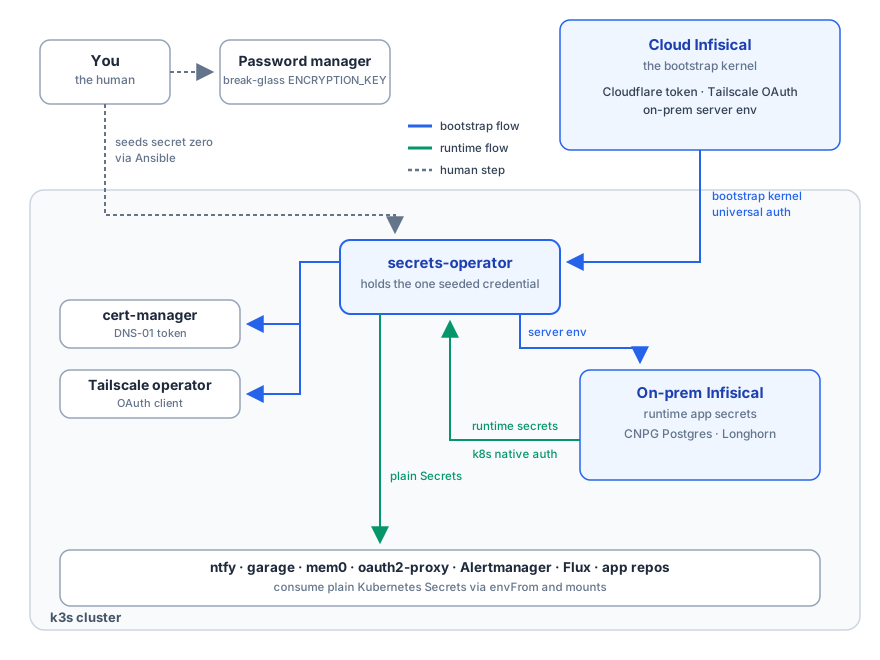
Runtime secrets with zero stored credentials
The auth model is what sold me. Every app authenticates with Kubernetes native auth. The operator presents the app's ServiceAccount token and the Infisical server validates it against the cluster's TokenReview API.
There is no clientId or clientSecret for any app, anywhere. There's nothing to leak and nothing to accidentally commit. Each identity is pinned to exactly one ServiceAccount in one namespace, with viewer access to one project.
The apps themselves have no idea Infisical exists. The operator turns each InfisicalSecret CR into a boring native Kubernetes Secret, and pods consume it with envFrom or a volume mount like it's 2016. The whole CR looks like this.
apiVersion: secrets.infisical.com/v1alpha1
kind: InfisicalSecret
spec:
  authentication:
    kubernetesAuth:
      identityId: <the app's identity>
      serviceAccountRef:
        name: myapp-infisical
        namespace: myapp
  managedKubeSecretReferences:
    - secretName: myapp-secrets
      secretNamespace: myapp
When I rotate a value, my whole job is pasting the new one into the Infisical UI. The operator updates the Secret and an annotation restarts the workload.
Names are also what make this safe for AI agents. An agent can list what secrets exist, reference myapp-secrets in the wiring it writes, and never see a value along the way.
One secret to carry
Under SOPS my secret zero was an age key that decrypted everything. Now it's a single cloud machine identity with viewer access to three bootstrap secrets. Losing it exposes those three secrets and nothing else.
It gets seeded by a one-shot Ansible playbook that reads the credential from environment variables instead of -e flags, because your shell history is not a secret store. The playbook writes it into the cluster as the one Secret the operator uses for cloud pulls.
I'd much rather babysit one tightly scoped credential than a god key.
Everything else it quietly does
Once the pattern existed, everything migrated into it.
- Flux's GitHub webhook token, so pushes trigger reconciles instantly
- Alertmanager's ntfy token, so my phone buzzes when something breaks
- cert-manager's Cloudflare token and the Tailscale operator's OAuth client, both on the cloud tier
- oauth2-proxy's session secrets, my S3-compatible storage keys, an OpenAI API key, and auth for half a dozen app repos that ride the same per-app pattern
A couple of design details are doing quiet work here too.
- The operator talks to the server over internal cluster DNS, so an in-cluster reconcile never touches Traefik, Cloudflare, or a TLS handshake.
- Apps that read secrets as env vars get an auto-reload annotation, so a rotation restarts them automatically. Apps that mount secrets as files, or re-read them per request, deliberately skip the annotation because kubelet and the app already handle updates. You have to know how each workload actually reads its secrets.
My favorite detail is that one of my apps has no runtime secrets at all, so it has no Infisical dependency at all. Apps that don't need the pattern don't pay for it.
The scars
Nobody blogs the error messages, so here are mine.
The Kubernetes auth host must be the full FQDN, meaning https://kubernetes.default.svc.cluster.local. The server's resolver doesn't apply the cluster DNS search domain, so the short name you'd naturally type fails with ENOTFOUND and no further explanation.
The server will refuse to call the cluster API at all until you set ALLOW_INTERNAL_IP_CONNECTIONS=true. That's its SSRF guard doing its job, but the failure looks like broken auth instead of a guard.
Orphaned Secrets stay dead. I use creationPolicy: Orphan so the operator would overwrite my old SOPS-managed Secrets in place during the migration instead of fighting them. The catch is that if a managed Secret gets deleted out from under the operator, say by a Flux prune, the operator's cache still says synced and it never recreates it. The fix is restarting the operator. Learned that one in production, if a homelab has production.
prune: false on the secret store itself. The server's database sits on volumes with a delete reclaim policy. One careless Flux restructure could cascade-delete the Kustomization, the PVCs, and every secret I own. So the GitOps machinery doesn't get to garbage collect the secret store.
Where it landed
That's the system. Two Infisicals, one credential outside it all, and every secret behind a name that agents can work with without ever reading a value. If you're weighing a similar move away from SOPS, the why post covers the trade-offs I accepted to get here.